
TABLE OF CONTENTS
- Overview
- Prerequisites
- 1. Receive a Serial
- 2. View Receiving History
- 3. Receiving an RMA Return (Supplier Sent Back)
- 4. Common Errors
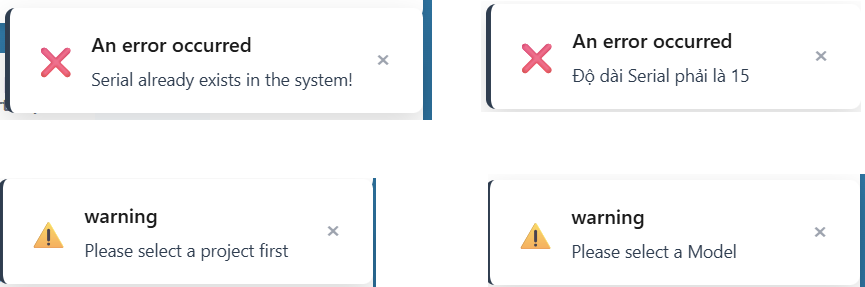
- 4.1 "Serial already exists in the system"
- 4.2 "Serial must start with [prefix]"
- 4.3 "Serial length must be [n]"
- 4.4 "Please select a project first"
- 4.5 "Please select a Model"
- 4.6 "Serial has been scrapped (Scrapped), cannot re-receive"
- 4.7 "Serial is in an internal process, cannot re-receive yet"
- 4.8 "Serial already received back (RMA status: [status])"
Overview
The Receiving station is the entry point for all products entering the production flow. Each product must be registered here before it can proceed to any other station.
Prerequisites
- Logged-in account with the Receiving or Admin role.
- A project must be selected from the Project dropdown at the top of the screen.
- A BOX ID must be prepared for the incoming batch.
- At least one Model must be configured under the selected project (Model Management tab).
1. Receive a Serial
Each product is received individually. You can scan barcodes or type manually.
- Navigate to the Receiving tab.
- Enter or scan the BOX ID in the BOX ID field. Once a value is typed, a "Current BOX" info bar appears below the form showing the BOX ID and the running item count.
- Enter or scan the Serial Number.
- Select the Model from the dropdown.
- (Optional) Enter Batch No, Station (defaults to Receiving-1), and Note.
- Click Receive Serial or press Enter.
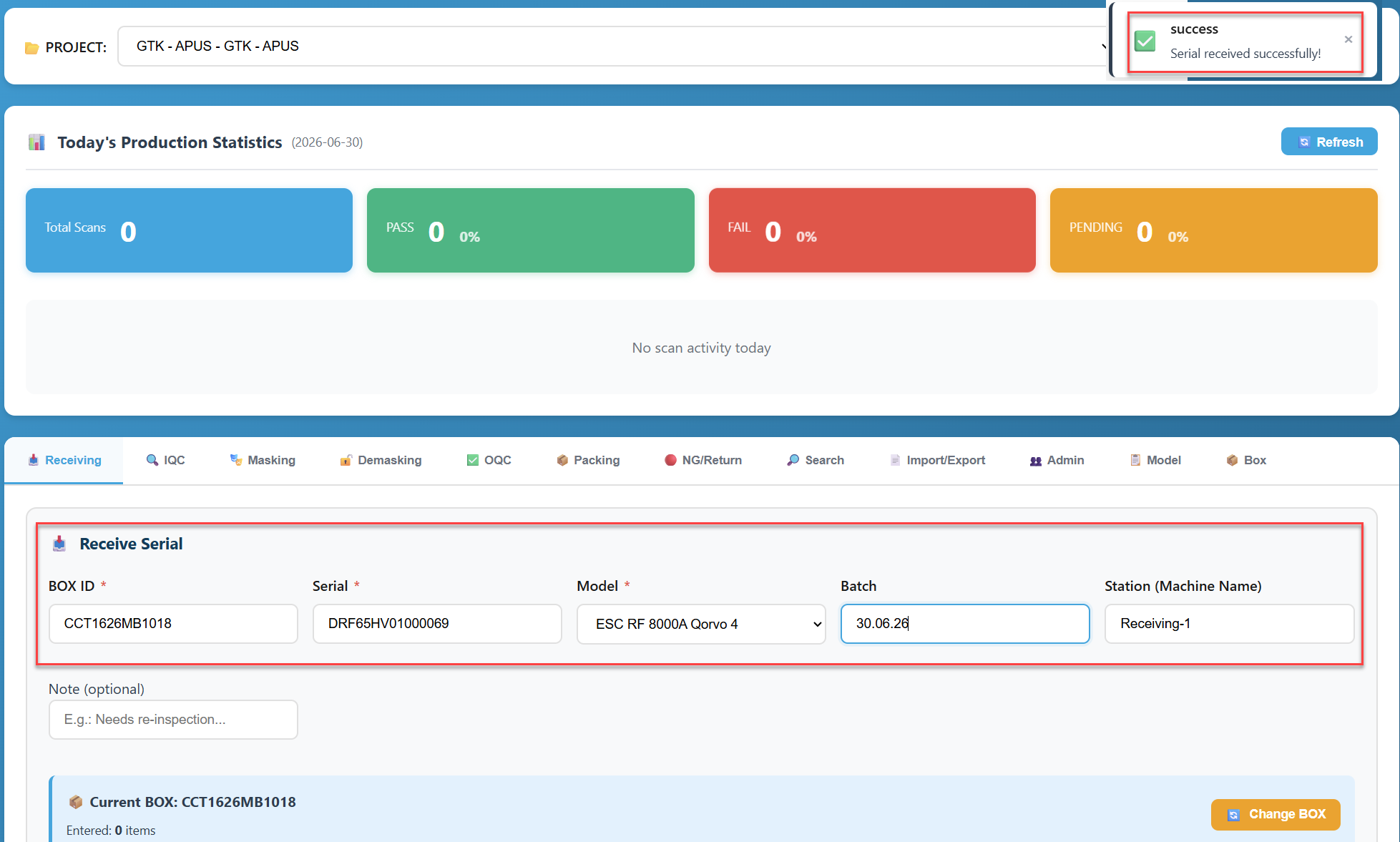
Note: After each successful scan, only the Serial Number field is cleared and focused. BOX ID, Model, Batch No, Station, and Note are all preserved so you can scan multiple serials into the same box without re-entering them.
The BOX ID field remains visible at all times. It is not hidden after entry.
1.1 Form Fields
Field | Required | Default value | Cleared after scan? |
BOX ID | Yes | — | No — preserved |
Serial Number | Yes | — | Yes — cleared and focused |
Model | Yes | — | No — preserved |
Batch No | No | — | No — preserved |
Station | No | Receiving-1 | No — preserved |
Note | No | — | No — preserved |
1.2 Current BOX info bar
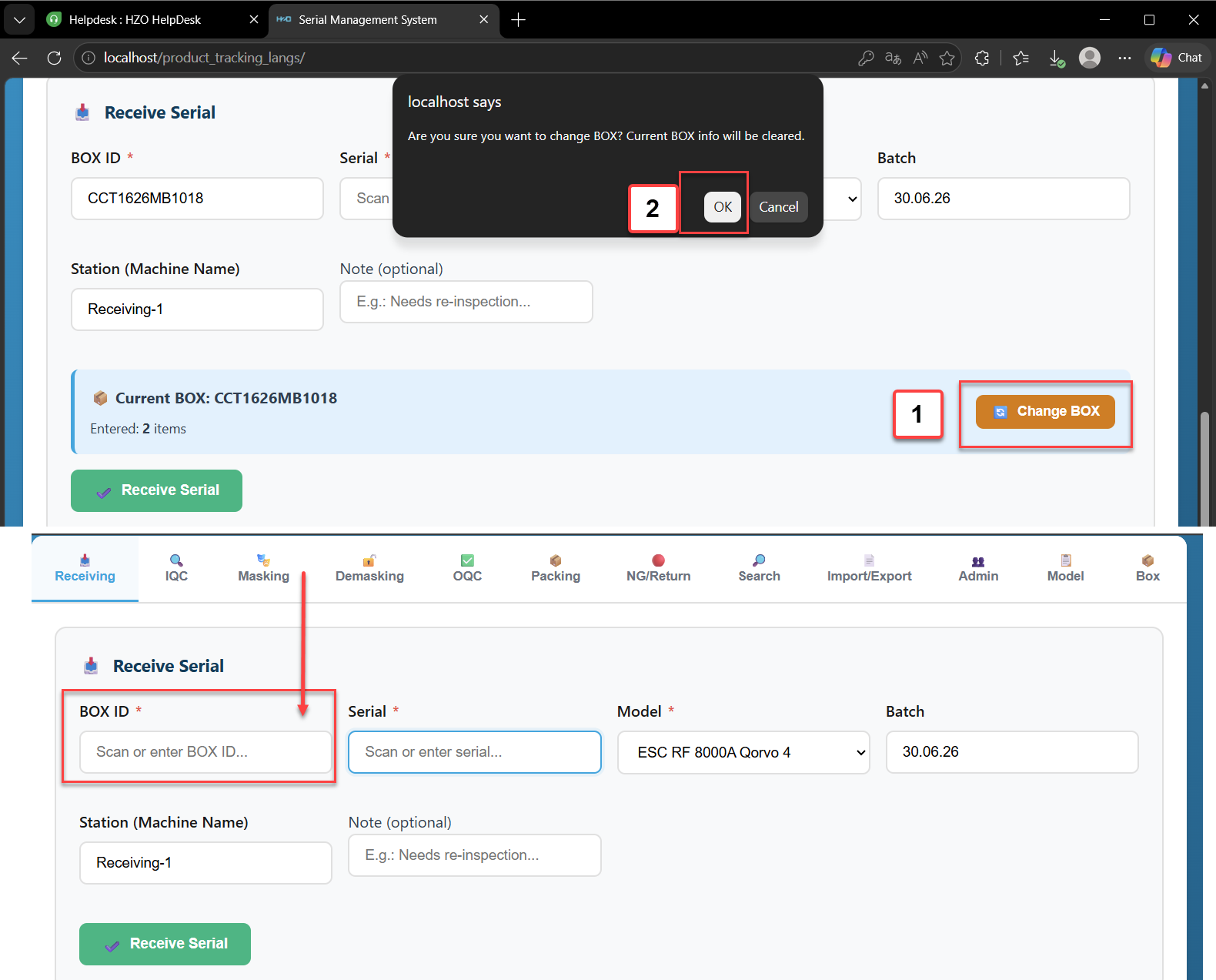
The Current BOX bar appears below the form after the BOX ID field detects a value (on change). It displays:
- BOX ID — the currently active box
- Item count — number of serials entered into this box in the current session
- A Change BOX button — click to clear the BOX ID field and reset the info bar. A confirmation dialog appears before clearing.
2. View Receiving History
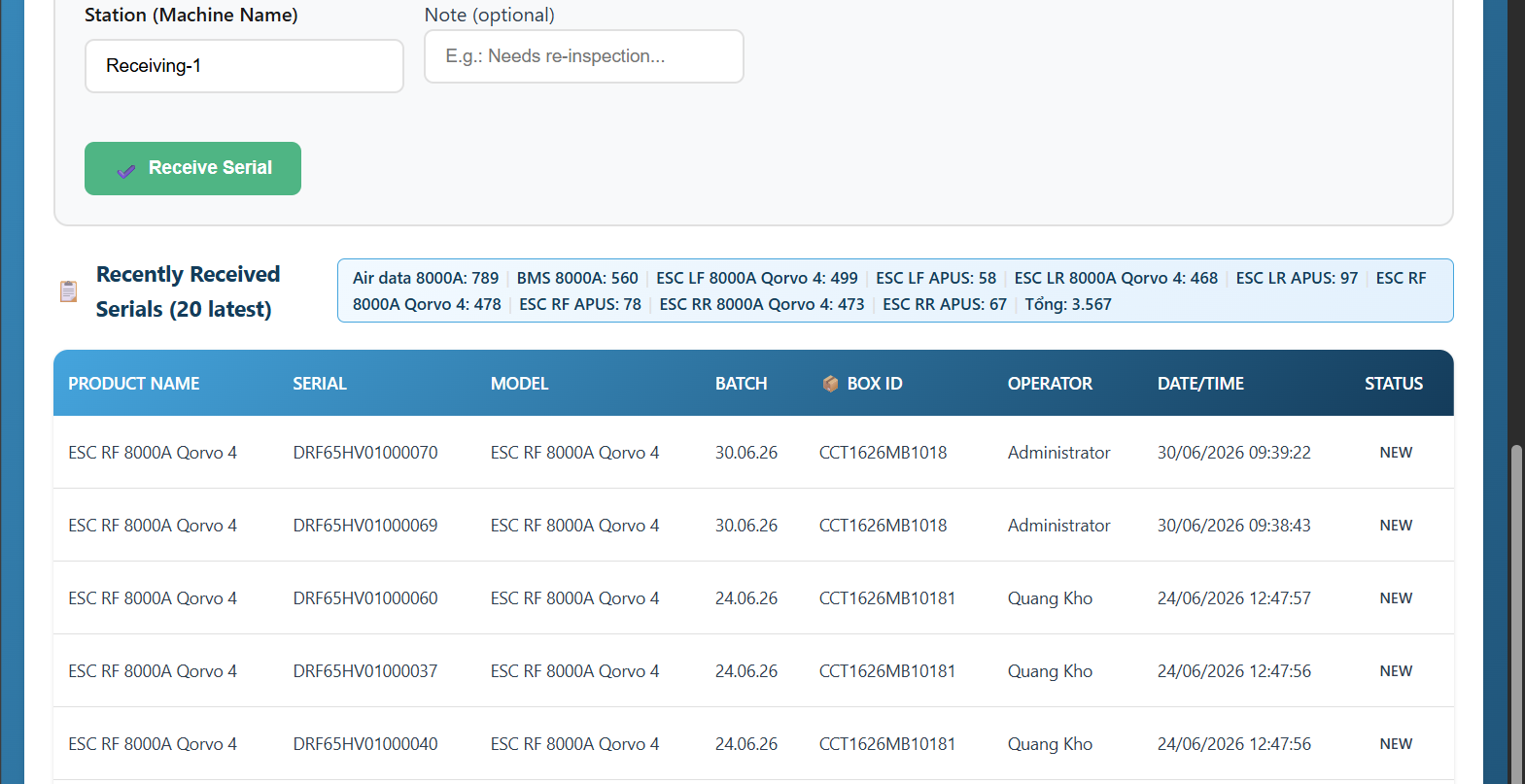
The Recently Received Serials table at the bottom of the tab shows the 20 most recently received serials for the selected project.
Columns: Product Name, Serial, Model, Batch, BOX ID, Operator, Date/Time, Status.
3. Receiving an RMA Return (Supplier Sent Back)
(RMA Return) are processed similarly to receiving new goods after the supplier has repaired them.
When a defective product has been repaired by the supplier and returned, it must be re-received through the Receiving station.
- Enter the BOX ID of the return shipment.
- Scan or enter the Serial Number of the returned item.
- Select the correct Model.
- Click Receive Serial.
4. Common Errors
4.1 "Serial already exists in the system"
The serial has already been received in this project and has no RMA return record.
- Verify the serial number (re-scan or retype).
- Do not attempt to receive the same serial twice for the same project.
- If received by mistake, contact an Administrator to investigate.
4.2 "Serial must start with [prefix]"
The model has a configured Serial Prefix and the scanned serial does not match it.
- Check that the correct Model is selected.
- Verify the serial number is not misread from the label.
4.3 "Serial length must be [n]"
The model has a configured Serial Length and the scanned serial has a different character count.
- Ensure the scanner reads the full barcode without truncation.
- Contact an Administrator if the model configuration needs adjustment.
4.4 "Please select a project first"
No project is selected in the Project dropdown.
- Select a project from the PROJECT dropdown at the top of the screen.
4.5 "Please select a Model"
The Model dropdown is empty or not selected.
- Ensure the project has at least one active Model configured (Model Management tab).
- Select the appropriate model before scanning.
4.6 "Serial has been scrapped (Scrapped), cannot re-receive"
The serial was marked as SCRAPPED in the RMA process and cannot re-enter the production flow.
- This serial is permanently retired. Do not attempt to re-receive it.
- Contact a supervisor if this is in error.
4.7 "Serial is in an internal process, cannot re-receive yet"
The serial exists with an RMA status of pending, repairing, or repair_pass — it is still being handled internally.
- Check the serial's RMA status in the NG/Return tab.
- Re-receive is only possible after the item has physically left the facility (shipped or packed into an RMA carton).
4.8 "Serial already received back (RMA status: [status])"
The serial has already been re-received after the most recent RMA cycle. It cannot be re-received again for the same cycle.
- Check the serial's current position in the Search tab.